Have you ever found the same product page, article, or category page at several different URLs? A tracking parameter, filter, or alternate URL can create multiple addresses for one piece of content. That can make it harder for search engines to understand which version you want people to find.
A canonical tag in SEO helps communicate that preference. This beginner-friendly guide explains what canonical tags do, when to use them, how to add one to your HTML, and how to avoid common setup mistakes. You will also see when a self-referencing canonical makes sense and how to create a tag with BrandUmark’s Canonical Tag Generator.
Table of Contents
- What Is a Canonical Tag in SEO?
- Why Do Canonical Tags Matter?
- Duplicate and Similar URLs Explained
- Canonical Tag HTML Examples
- What Is a Self-Referencing Canonical?
- How to Choose the Right Canonical URL
- How to Implement a Canonical Tag
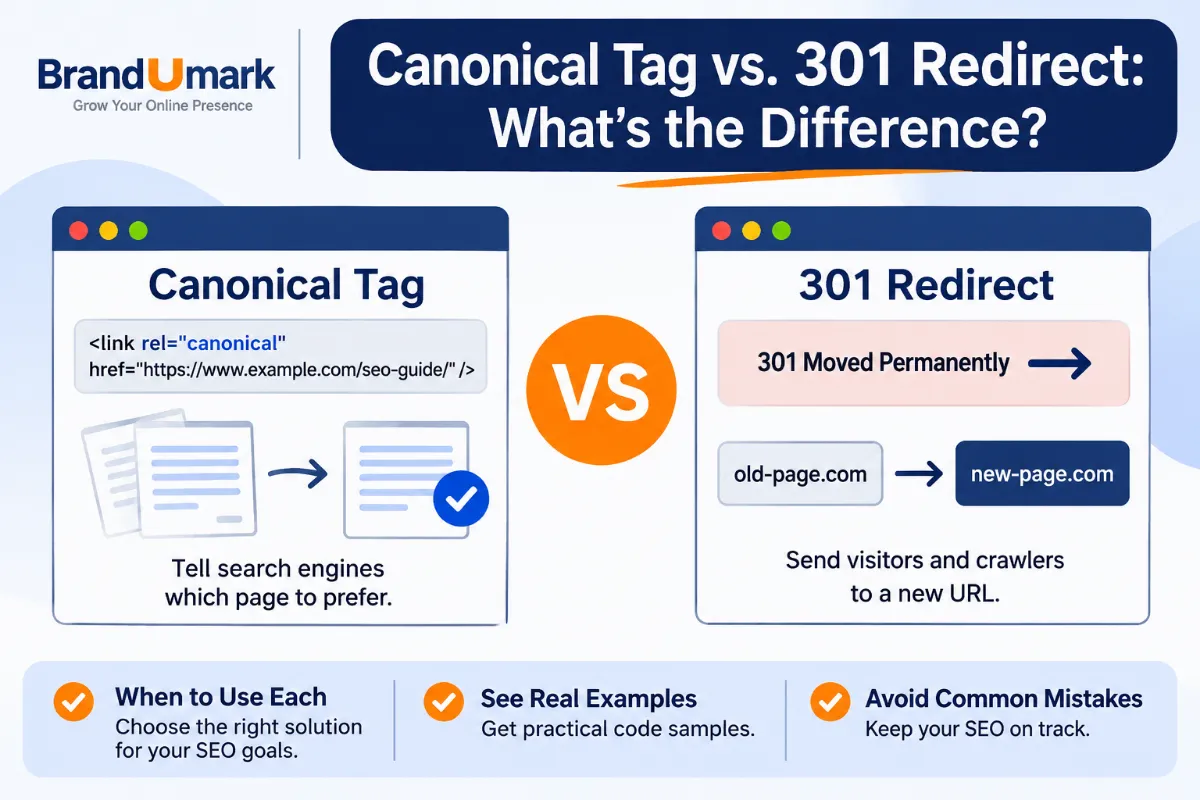
- Canonical Tags vs. Redirects
- Common Canonical Tag Mistakes
- Conclusion: A Simple Canonical Tag Checklist
- Frequently Asked Questions
What Is a Canonical Tag in SEO?
A canonical tag is an HTML link element that identifies the preferred, or canonical, URL for a page. It is placed in the page’s <head> section and uses the attribute rel="canonical".
For example, imagine your website has two URLs that show the same article:
https://example.com/seo-guide/https://example.com/seo-guide/?source=newsletter
If the first URL is the version you want search engines to prioritize, the second page can include a canonical tag pointing to it. This tells search engines that the clean URL is your preferred version.
The canonical element is usually written like this:
<link rel="canonical" href="https://example.com/seo-guide/">The URL inside href is the preferred URL. Search engines use this information alongside other signals, such as redirects, internal links, sitemap URLs, and the content itself, when selecting a canonical.
Canonical URL vs. canonical tag
These terms are related, but they do not mean exactly the same thing. A canonical URL is the preferred address for a group of duplicate or similar pages. A canonical tag is one way to tell search engines which address you prefer.
For example, if three URLs contain substantially the same article, you may choose one as the canonical URL. The other two pages can then point to that preferred address using canonical tags.
Why Do Canonical Tags Matter?
Websites often create multiple URLs for content that is identical or nearly identical. This can happen through tracking parameters, sorting options, session IDs, print pages, or alternate paths to the same content.
Without clear signals, search engines may have to determine which URL should represent the content in search results. Canonical tags help you communicate your preferred version.
They help consolidate duplicate URL signals
When search engines recognize several URLs as duplicates, they may consolidate signals associated with those URLs and select one canonical version. A canonical tag can help indicate which URL should receive that treatment.
They clarify which URL you want indexed
Suppose a product page is accessible through several parameter combinations. You generally want the stable product URL, not a URL containing temporary tracking details, to represent the page in search results. A canonical tag helps express that preference.
They support cleaner URL reporting
Multiple versions of a page can make analytics, search performance reviews, and troubleshooting less straightforward. A consistent preferred URL gives your team a clearer reference point when reviewing pages and their performance. You can also use a structured SEO audit to spot technical issues that affect how search engines access important URLs.
They help manage large websites
Online stores, travel sites, publishers, and directories can generate many URL variations. A clear canonical strategy can help search engines understand which versions are primary and which are alternate versions of the same content.
Duplicate and Similar URLs Explained
To understand canonical tags, you first need to understand why one page can have multiple URLs. Some variations are created intentionally by your website. Others appear because of tracking systems or the way your content management system handles navigation.
Common examples of duplicate URLs
These URLs may show the same page even though their addresses look different:
https://example.com/services/andhttps://www.example.com/services/https://example.com/blog/seo-basics/andhttps://example.com/blog/seo-basics/?utm_source=emailhttps://example.com/products/shoes/andhttps://example.com/products/shoes/?session=123https://example.com/pageandhttps://example.com/page/
Whether these are duplicates depends on how the server responds and what content each URL serves. Do not assume two URLs are duplicates simply because they look similar.
What about similar, but not identical, pages?
Two pages can share much of their content without being exact copies. For example, an online store may have a product page for a blue shirt and another for the same shirt in green. Their descriptions may be almost identical, but the color and product details can make them meaningfully different pages.
Canonicalizing one page to the other is not automatically the right choice. If each page serves a distinct search purpose and provides useful, unique information, each may deserve its own canonical URL.
Consider these examples:
| URL situation | Possible approach |
|---|---|
| Same article with a tracking parameter | Point the parameter URL to the clean article URL. |
| Same product available through two navigation paths | Choose one stable product URL as canonical. |
| Separate product colors with distinct content and demand | Evaluate each page separately. Do not automatically combine them. |
| Printer-friendly copy with the same article | Usually point the alternate version to the main article URL, if it should not stand alone in search. |
| Different articles covering different questions | Use separate canonicals when each page is independently useful. |
Canonical Tag HTML Examples
The easiest way to understand canonical tags is to look at the HTML. The examples below use the fictional domain example.com. Replace it with your own preferred URL when implementing a tag.
Example 1: A basic canonical tag
If this is the preferred version of your page, add the following element inside the document’s <head> section:
<head>
  <title>Beginner's Guide to SEO</title>
  <link rel="canonical" href="https://example.com/seo-guide/">
</head>
The canonical URL is https://example.com/seo-guide/. Search engines can use this signal to identify the version you prefer.
Example 2: A URL with tracking parameters
Suppose visitors arrive at your article through an email campaign. Your analytics platform adds a tracking parameter to the URL:
https://example.com/seo-guide/?utm_source=newsletterThe page can include this canonical element:
<link rel="canonical" href="https://example.com/seo-guide/">This indicates that the clean article URL is preferred over the tracked version. You can still use tracking parameters to measure campaign traffic.
Example 3: Two pages with the same content
Imagine the same guide is accessible at two URLs:
https://example.com/guides/canonical-tags/
https://example.com/canonical-tags-guide/
If you want the first URL to be the canonical version, the alternate page can include:
<link rel="canonical" href="https://example.com/guides/canonical-tags/">For a long-term URL change, however, a permanent redirect may be more suitable if the old URL should no longer be accessed separately. The right choice depends on whether both URLs need to remain available.
Where should the canonical tag go?
For a standard HTML page, place the canonical link element in the <head> section. It should use a fully qualified URL, including the protocol and domain, so the preferred destination is unambiguous.
Use one clear canonical declaration per page. Conflicting canonical elements, or a canonical tag placed in the wrong part of the HTML, can make the signal harder for search engines to interpret.
What Is a Self-Referencing Canonical?
A self-referencing canonical is a canonical tag that points to the same URL as the page it appears on. In other words, the page identifies itself as its preferred version.
For example, if the page URL is https://example.com/seo-guide/, its HTML can contain:
<link rel="canonical" href="https://example.com/seo-guide/">This tells search engines that the clean URL is the preferred version of that page. It can also help keep canonical signals consistent when URL variations exist.
Why use self-referencing canonicals?
A page may not have an obvious duplicate today, but parameters or alternate URL paths can still create variations. A self-referencing canonical makes your preferred URL explicit rather than leaving the choice entirely to search engines.
Self-referencing canonicals are commonly used on important indexable pages, including blog posts, product pages, and category pages. They are not a substitute for checking whether the page should be indexed or whether another URL is the better canonical.
https://example.com/seo-basics/, the canonical URL should normally match that exact preferred address, including your chosen HTTPS, hostname, and trailing-slash format.How to Choose the Right Canonical URL
Choosing a canonical URL requires more than picking the shortest address. The preferred page should be the version that best represents the content and that you want search engines to use as the main URL.
Use the URL you want people to find
Choose the stable, user-friendly URL that should appear in search results. Avoid selecting a temporary tracking URL, session-based address, or a version that exists only because of a filter or sorting option.
Check that the destination is accessible
Your canonical URL should load successfully and return the intended page. Avoid pointing canonicals to broken URLs, redirect chains, or pages that return an error.
Keep canonical signals consistent
Make sure the rest of your website supports the same preference. This is one part of a broader SEO strategy, where technical signals should support the pages you want to perform in search. If your canonical tag points to one URL but your internal links and sitemap repeatedly promote another, you are sending mixed signals.
Canonical URL review checklist
- Choose the preferred page that best represents the content.
- Use the correct HTTPS version and preferred hostname.
- Check the trailing-slash format used by your website.
- Confirm that the canonical URL loads successfully.
- Make sure the canonical destination is not blocked from crawling.
- Use consistent internal links and sitemap URLs.
- Avoid pointing unrelated pages to one broad URL.
How to Implement a Canonical Tag
You can add a canonical tag manually or use your website platform’s SEO settings. The best method depends on your content management system and how your site generates pages.
For a custom HTML website
Open the HTML template for the page and add the canonical element inside the <head> section. If your website uses shared templates, confirm that the canonical URL is generated dynamically for each page rather than copied across the entire site.
For WordPress websites
Many WordPress SEO plugins generate canonical tags automatically. The exact controls depend on the plugin and your site’s configuration. Check the page-level SEO settings and inspect the rendered page source to confirm that the expected canonical URL appears.
Do not add a second canonical tag manually if your theme or SEO plugin already outputs one. Two different canonical declarations can create conflicting signals.
Use BrandUmark’s Canonical Tag Generator
If you need to create a canonical element for a page, BrandUmark’s Canonical Tag Generator can help you prepare the HTML tag. Enter the preferred page URL, generate the markup, and add it to the correct location in your page template or SEO setup.
Before publishing, review the generated URL carefully. A generator can create the markup, but you still need to decide which page should be canonical and verify that the implementation is correct.
Test the implementation
After adding the tag, inspect the rendered HTML or page source. Search for rel="canonical" and confirm that the href value matches your intended preferred URL.
You can also use Google Search Console to inspect a URL and review Google’s selected canonical when that information is available. Compare Google’s selection with the canonical URL you declared.
Canonical Tags vs. Redirects: What’s the Difference?
Canonical tags and redirects can both help manage URL variations, but they serve different purposes. A canonical tag recommends a preferred URL while leaving the alternate URL accessible. A redirect sends visitors and crawlers from one URL to another.
| Feature | Canonical tag | Redirect |
|---|---|---|
| Main purpose | Indicates the preferred URL among duplicate or similar pages. | Forwards a request from one URL to another. |
| Can visitors access the alternate URL? | Usually yes. | They are sent to the destination URL. |
| Best suited for | Useful alternate URLs that should remain accessible. | Pages that have moved or should no longer have a separate URL. |
| Is it a directive? | No. It is a canonicalization signal. | A server or platform instruction that changes the requested destination. |
For example, a tracked URL with a campaign parameter may remain useful for analytics, so a canonical tag can point to the clean page. If you permanently move an article to a new URL and no longer need the old address, a permanent redirect is often the more appropriate option.
Common Canonical Tag Mistakes
A canonical tag is a small piece of HTML, but an incorrect URL can create confusion across many pages. Review these mistakes before and after implementation.
1. Pointing every page to the homepage
This is one of the most damaging configuration errors. If every blog post, product, and category page points to the homepage, you are telling search engines that the homepage is the preferred version of unrelated content.
Each page should generally point to its own preferred URL unless it is genuinely a duplicate or alternate version of another page.
2. Using a relative URL instead of an absolute URL
A canonical tag should use a fully qualified URL, such as https://example.com/page/. This makes the intended protocol and hostname explicit and reduces ambiguity.
3. Creating conflicting canonical tags
More than one canonical declaration can send mixed signals, especially when different tags point to different destinations. Check your theme, SEO plugin, and custom code to make sure only one consistent canonical is generated.
4. Canonicalizing pages that are not duplicates
Pages that target different topics or provide distinct information should not be combined just because they share a few paragraphs or a similar layout. Review the actual content and search intent before selecting a canonical destination.
5. Pointing to a redirected or broken URL
Your canonical URL should normally resolve directly to the preferred page. If it redirects or returns an error, update the canonical to the final, working URL.
6. Blocking the canonical page from crawling
Search engines need to access the canonical URL to understand the signal. Avoid creating conflicts between canonical tags, robots directives, and other crawl controls.
7. Forgetting to update internal links and sitemaps
If your canonical points to one URL while your sitemap and internal links consistently use another, your site is sending inconsistent preferences. Update these signals together when you change a URL structure. If you manage crawl directives as well, review your robots.txt configuration so it does not block important canonical URLs.
Conclusion: A Simple Canonical Tag Checklist
A canonical tag in SEO helps search engines understand which URL you prefer when duplicate or very similar pages exist. It is especially useful for managing tracking parameters, alternate URL paths, and other variations that can make one piece of content accessible through several addresses.
Start with the pages that matter most to your website. Choose the correct preferred URL, add one consistent canonical tag, and make sure your internal links and sitemap support the same version. For a quick way to prepare the HTML, try BrandUmark’s Canonical Tag Generator.
- Find URL variations. Identify duplicate or near-duplicate pages created by parameters, navigation paths, or alternate versions.
- Select the preferred URL. Choose the stable page that best represents the content and should appear in search results.
- Add the canonical tag. Place one accurate, absolute canonical URL in the page’s HTML head or configure it through your SEO platform.
- Check supporting signals. Align internal links, sitemap entries, redirects, and crawl settings with your preferred URL.
- Review the result. Inspect the rendered HTML and use Google Search Console to compare your declared canonical with Google’s selected version.
Frequently Asked Questions
1. What is a canonical tag in SEO used for?
A canonical tag in SEO tells search engines which URL you prefer to represent duplicate or very similar pages. It helps clarify your preferred version, but search engines can choose a different canonical based on other signals.
2. Is a canonical tag a ranking factor?
A canonical tag is primarily a URL and canonicalization signal, not a direct ranking boost. It can help search engines consolidate duplicate URL signals and understand which page you want treated as the main version.
3. Should every page have a self-referencing canonical?
Self-referencing canonicals are a common best practice for indexable pages because they make the preferred URL explicit. However, the correct setup depends on the page and your site’s URL structure.
4. Can I use a canonical tag for duplicate content?
Yes. If multiple URLs contain duplicate or substantially similar content, you can use a canonical tag to indicate the preferred version. Make sure the pages are genuinely appropriate to consolidate before doing so.
5. What is the difference between a canonical tag and a 301 redirect?
A canonical tag recommends a preferred URL while keeping the alternate URL accessible. A 301 redirect forwards visitors and crawlers to another URL, making it more suitable when a page has permanently moved.
6. Where should I place a canonical tag in HTML?
Place the canonical link element inside the page’s <head> section. Use a fully qualified URL in the href attribute.
7. Can canonical tags point to another domain?
Yes. Cross-domain canonicals can be used when the same or substantially similar content is published on more than one domain and you want to indicate the preferred source URL. Use them only when the relationship between the pages is genuine and appropriate.